Showing posts with label music mondays. Show all posts

Monday, October 3, 2011

Music Mondays - Editing Your Own Music Using Audacity


     Editing your team’s music at home sounds like a daunting idea to many teams, but it is a skill that can save you time, money, and make your professional mixes sound the way you expect with the least effort and wasted time.  Today, we’re talking about the best free at home software – Audacity.  This is a program I have sworn by since I first used it (due to a desperate lack of options) back in 2005.  I had no money to spend on music for fall football, but there were a pile of projects waiting to get done.  Now that I know what I’m doing there is no end to the uses for Audacity.  I fix speed problems, make fall songs, get dances ready for kids clinics, edit practice music, make something quick when the JV music doesn’t work right, you name it.  

    Understanding a bit at home also makes you more productive in the professional studio.  You know what a realistic cut is and how things might possibly sound before you get there and just hope for the best.  Just hearing a song with a proper speed change can give you an idea of what will work in a mix.  Its also great to make a few different speeds for practice so you're not playing guess and check with your music equipment.  

    Lets dig into a quick tutorial of just the very basics of this awesome program:  If you’re not a technical person you might want to take a deep breath, relax, and read things carefully.  This isn’t overwhelming but its new – I really think anyone can learn this by trial and error and by not getting frustrated.  

     First off, you need to get the program.  It’s free from the creator and is a safe download.  They have a “beta” version out right now – I’d skip that and stick with their current version: Audacity 1.2.6 (if you have a Mac or Linux there are those versions too)  You’ll also want the MP3 encoder plug-in (link is just below the main download) so you can make your finished product an MP3 rather than a poor quality .WAV file (this used to be the only way to do it when I first learned, not a good quality for playing in gyms) More info here.  Install and setup as directed.  

     Next, import the audio file(s) you want to work on.  These can be MP3s or something from a CD, anything downloaded on your computer.  This step is done by going to PROJECT>IMPORT AUDIO.  If you go to FILE>OPEN it will want you to open an Audacity project file, which you don’t have one yet.  A “stereo” track will now appear in the work area.  

    Understand what you are looking at:  There are 2 identical lines of audio sound waves that are being shown to you visually.  This is one for each channel (speaker) in a stereo setting.  For dance team, you want your projects to be in stereo sound.  Audacity lets you edit both stereo tracks at the same time; don’t worry about trying to do just one or the other, they are locked together. 

    Playing audio and finding an edit: Try playing your song you’ve imported.  There are play, stop, and pause buttons just like a boombox on the main tool bar above your song.  You’ll see a line going from left to right across your file as it plays.  This is your marker of where you are at in the song.  Also at the top left corner are 6 tools.  Initially you’ll only need the highlighting tool (looks like an “I”) and the magnifying glass just below it.   

Pause the line about where you think you would like an edit in your song then switch your tool to the magnifying glass to zoom in to that section.  The visual sound waves you see will help you adjust your paused line to just the right instant for the cut.  Try playing that small clip over and over to hear if the cut should be moved forward or back.    To move your curser “line”,  just click at the point you’d like it to go.  Highlight (click on your line, hold it, and drag to the ending location to highlight when you are using the highlight tool) that area you’d like to remove, then look to your cut/copy/paste buttons on your toolbar.  The scissors is cut, the two pages side by side are copy, and the clipboard is paste.  This way you can duplicate, remove, or move sections to whole new areas just like you would work with a Microsoft word file.   
    I have a pen and paper handy at this point to write down edit locations if I need to leave them and come back.  Look at the lower right hand corner to see the exact second of the track you are on.  Try to get to 4 decimal places out to be really accurate in your highlighting.  (i.e. 1:30.3345 is one minute, thirty seconds point three three four five)

    Using more than one song: If you’d like to move something away for a while or bring in something from another song, just open another window of Audacity and flip between them.  This is the easiest way to keep projects named and saved correctly.  Or you can work from one window and make a new stereo track below your current project and move things to there.  Be sure to delete this track when you are done or it will play both simultaneously and sound like a mess.  (or sound awesome if you edit it that way!)  When you export the song at the end, the multiple tracks will compress to become one.

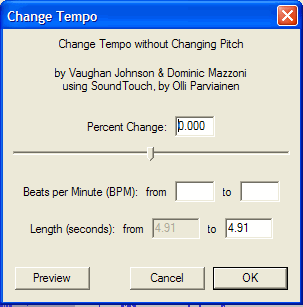
Making adjustments:  The biggest tool I use after making edits is to adjust my speeds.  There are several ways to do this in Audacity.  I like to change the TEMPO not the PITCH.  (chipmunk effect is not wanted here!) Remember, to make any change or apply effects – the area must be highlighted.  Go to EFFECT>CHANGE TEMPO and adjust using the menu.  You can always undo something using EDIT>UNDO if you don’t like it.  I always change my speeds to match when editing multiple songs together FIRST, so I don’t have to try to find each edit again and possibly get it wrong.  There are multiple crossfade and sound effects to play with in this menu as well.  I would also NORMALIZE the final product if there is any techno involved so you don’t hear a distorted mess that has “clipping”.  EFFECT>NORMALIZE

    Saving and exporting your finished product: Make sure you SAVE and UNIQUELY NAME your project you’re working on, re-saving constantly.  The saved file is a unique file type for Audacity, it is not yet an audio file, but this is the file you will use to come back and edit again at a later time.  When you are done, export the audio as an MP3 from the FILE menu.  (this is the only way to get an audio track for your CDs and MP3 players.  Audacity files don’t make sound, they are data files only)

     Overall Audacity is really intuitive when it gets down to it.  Not sure?- Try something.  You can always go back.  If something isn’t happening as it should, make sure you have highlighted something to change or check that you’re not on “pause” – some things can’t happen until you fully stop playing the audio.  I’ve included links to the Audacity Wiki here for more in-depth discussion.  Have fun, dream big, make it the best! 

Monday, September 26, 2011

Music Mondays - Like This, Try That: State 2011 Edition

Everybody has their favorite songs from each passing state tournament, and 2011 was no exception.  While there is nothing better than seeing a team master the art of picking a good song and matching it to a good dance at state - but it can quickly be ruined by watching it get reused over and over again in years following.  While there is something to be said for doing a well used song - and doing it better - I have always found there are ways to take your favorite dances of the past and capturing their magic without copying them in an exact sense.  Here is my list of some of the most "copyable" songs from state 2011, and some suggestions for what to do instead.  See what else you can come up with! 

First up: Totino Grace -  Mambo Italiano.  What a fun vintage inspired song choice this was.  What I think this goes for is a special feel of a vintage 50's/60's era and plays well to a theme costume and movements.  Try anything from the Mad Men soundtrack too.

St. Charles - Stuck on You.  Talk about sugar sweet adorable fun.  I can't believe how many times people have said this dance was "cute".  Great way to work with a lower skill level and maximize the creativity.

Benilde-St. Margarets - Heart of the Matter.  This was a return to something more along the lines of the John Mayer song "Say" that they did 2 years previously.  There are some 90s tunes to look at and some things along a similar vein.  Handsome Boy Modeling School's version of Jack Johnson's Breakdown is amazing.  

Tuesday, September 20, 2011

Music Mondays - Dirty Dog Productions Interview (pt.2)

Erin: Any favorite or memorable dance team projects you worked on? (and why)


Mark: Cannon Falls has allowed me to do some pretty interesting mixes over the last few years. I did a Ke$ha mix last year for a camp routine for Hayfield what I liked a lot. Most of the teams will trust me to make some changes and additions to their plans, though not all will have the finances to do complete remixes. I recall a mix a few years ago where I had to literally add instruments to the mix to make it work the way the team wanted. I was composing new string parts, new brass parts, new synth parts, all to supplement what was there in the mix but not giving it the energy that they wanted without the additions.


Erin: I think you’re talking about our mix for Cannon jazz in 09 – The Wall. Now THAT was something new. We had a costume we couldn’t reuse from the year before and the song fell into place after hearing it at a dance party (while complaining about the situation we were in). When we brought it to you we had no idea how something with so little to dance to would work, but you wrote some key changes to make it mesh with our techno song underneath. I think only 20 seconds of the original Pink Floyd was actually used when all was said and done. That same year you wrote all of the “straightline” music for the TLC kick dance we did. There wasn’t a highlight of the dance until you made one. If you want that though, it took extra planning and lots of extra time and money. Fortunately our school paid for the music without giving us a budget. Needless to say the next year they wanted a cost estimate. haha

Erin: So after a project like that one, are there any key elements to making sure you get a good mix? Something other than saying I want it to sound like this other song or team? I know you mentioned lots of source material and the possibility to isolate single vocals or sounds.

Mark: It is always easier to build a complete remix if there are lots of isolated elements in some of the songs. For example, sections of a song with just beats, but no vocals, bass or guitars. Sections of vocals without beats and harmonic backgrounds. Any time I can find and isolate a vocal part (a word or a phrase), or a beat, or a guitar lick, or some off the wall talking thing or funny sound effect, I can recombine them with other elements of other songs in the mix, often in very surprising and unexpected ways. I can totally amuse myself at times with things that seem to come together. I mentioned beats per minute is a good thing to be aware of. Also, be aware that technology does not yet let us remove elements from a mix, so I can't pull out a vocal part or other sound from an existing song. Also, layering different songs together (ala a mashup) often works less well than one would hope. You have too many competing elements like keys, bass lines, drum parts, vocals, etc. Even if you can get things in the same keys, the results are usually kind of disappointing.


Erin: Agreed. It can be tough to understand what will work in the real world when you hear LA DJs doing mashups, but they have the source tracks with all the elements isolated down to each and every kick drum, vocal, bell, and whistle. We don’t bring that to you so its not the same to pick it apart they way record labels can. I also think you’ve also had me bring in many versions of the songs you I want - live, acoustic, remixes, dance tracks can all have snippets of something to make it what you want. Even if it’s only a one second edit.

Here's some shots of Mark's gear:  Notice the Chemical Brothers CD? 
 

This pup is the original dirty dog:  Boris!  (who sleeps through all the mixing sessions)

Monday, September 19, 2011

Music Mondays - Dirty Dog Productions Interview (pt.1)

Its Monday - (ouch) so we're back for another article for Music Mondays!  Today was a little lengthy, so part 2 is coming up tomorrow - stay tuned! 

I’m here sitting down with a long time dance team professional and music maker extraordinaire- Mark Henderson, at Dirty Dog Productions. Mark has a long and storied history with dance team from back when his daughters danced for the Burnsville Blazettes in the 90s. I first got a chance to meet him when I was a choreographer on the Winona dance team in the late 90s and it was “so cool” to come to Minneapolis to have him do the music. A decade later, he’s doing projects for me still.


Mark has a keen ear for all the needed tweaks and touches that make his mixes stand out in the crowd, and I’ve come back to him year after year for projects and dreaming sessions. After many years in a downtown Minneapolis studio, Mark has now moved his enterprise to his home in NE Minneapolis. (Just down the road from myself!) I got a chance to talk shop and take some photos of the impressive gear Mark runs just for Minnesota High School Dance Team Online:


Erin: So Mark, tell me a little bit about how you got started working with dance teams, weren’t your daughters Blazettes?


Mark: I have two daughters, Mandy and Lauren, who were on the Blazettes from 1998-2002 (they overlapped one year). Were State champs four of those five years if my memory is correct.


Erin: Yes, yes they were. I remember dancing for Apple Valley and being “arch rivals” during that time. Seems like ancient history now.


Erin: Do you think your other musical pursuits (teaching, playing for orchestras and shows, ect) helps you in your dance team editing?

Mark: I think it helps somewhat to understand key signatures, harmonic concepts, rhythmic concepts, and instrumentation. Understanding how to make things go together in mixes when they come from different keys, different sound textures and things like that help me work at some more creative kinds of problem solving, but it don't think it is an absolute requirement. It just helps me to work out some of the more complicated remix projects that I end up doing. It always helps to understand beat structure in music though. Couldn't do much dancing without that!


Erin: What do you wish coaches would know more about before they come to work with you? Anything that really slows the project down and adds time and costs in particular?


Mark: Coaches and teams that are doing fairly simple edit/cut mixes can save a lot of time and money by having cut lists prepared for me. A list of the songs and the timings of what they want to use, in what order. Speed adjustments will often take more time, as some of that is trial and error and hard to predict ahead of time. Complicated mixes usually require more time for me to experiment with putting different elements together, and that is not only hard to do when the coaches or team members are sitting there, but also pretty boring to have to watch. It would be like watching someone paint a picture. Better to come back later and see what it looks like then. One of the most important things for coaches to understand is beats per minute (bpm). It's like tempo to a musician and not too hard to figure out. Count the number of beats in a song over 15 seconds and multiply by four to get your result. Most high kick music is about 142-156 bpm. If your source material is closer to those tempos, then you don't have to make such extreme changes in the music speeds to get it to danceline tempo, and you can avoid the chipmunk effect.

Erin: Understanding speeds can help you in your practices too. I’ll have an upcoming article on using BPM and understanding it. For now, you can use my favorite online way to count BPM, just click your mouse to the beat! Online BPM meter  It also gives you a way to calculate your % change you need for competition day.

A photo of Mark at work - that monitor is 30"!  Thats bigger than a lot of TVs....
 
Stay tuned for part 2 tomorrow!

Monday, September 12, 2011

Music Mondays - The Sounds of Fall

We're starting a new series on Mondays from now until the start of the winter season called Music Mondays!  This will be a look at the ins and outs of picking, editing, finding, and working with music from a dance team perspective.  Because after all, music is the most important thing not on the scoresheet!  This week, a look at the songs filling practice gyms and football fields for the fall season.

Upcoming Articles:
-Mark Henderson, Dirty Dog Productions Interview
-Editing music at home with Audacity
-Making an effective practice track CD with Pyro
- Like this: Try That (State 2011 Edition)
- and MORE!

The SOUNDS of Fall Season:
                With football season kicking off all around the state, we’re hearing new songs for fall performance teams echoing through stadiums, letting us know that fall is really here.  Aside from the perennial favorites from the JFK camp soundtrack, what else can be used for fall performances and even practices?  If you are in need of something to spice up fall drills or performances – I have a soundtrack of some new ideas for this season. 
 Hello – Martin Solveig:  This song will be great for across the floor drills, fall performances, and might even make it into some winter mixes.  Something about this is new and fresh, yet classic house dance music. 
Pumped Up Kicks – Foster The People:  Well the name sure suggests this one to you, but it’s great for walking kicks across the floor and the dancers are probably already rocking this on their Ipods – so it’s an instant practice favorite.  I would love to see someone find a way to mix this one into a winter dance….what a challenge that one would be. 
Party Rock Anthem – LMFAO:  This one I know I’ve heard everywhere already, but what a fun fall football song.  This one will likely make winter appearances as well. 
Moves Like Jagger – Maroon 5:  If you can get away with the slightly “interesting” lyrics in this one, I’d pump it at practice for some fun, contagious energy this song drives.  I wish it had a tamer version for some winter mixes, but alas, I think this one will be relegated to practice time. 
Just Can’t Get Enough – Black Eyed Peas: This one will be everywhere in performance mixes and probably a lot more BEP in the winter season too – they’re really coming out with good dance music left and right.  Not to be missed.
Put Your Hands Up – Kylie Minogue: #1 dance track right now.  This artist is often overlooked here in the US, but has a great dance team worthy sound.